# Add a ElasticSearch connector

## Connector features

You can use the Toucan Snowflake connector to connect to your Snowflake account with a key-pair authentication or basic authentication and access `tables` or `views` with a JSON query.

With this connection, you can fetch data from your Snowflake to fill your charts and dashboards.

{% hint style="info" %}
**Changelog**

**July 25**\
\- We have upgraded our client ElasticSearch and v9 is now enforced
{% endhint %}

## Configuring an ElasticSearch connection

Follow the steps described in [..](https://docs-v3.toucantoco.com/data-management-in-datahub/datasources-in-toucan/managing-connectors/setting-up-a-connector "mention"), choose `ElasticSearch` and fill out the form with the following info:

<table><thead><tr><th>Field</th><th width="137.6015625">Format / Type</th><th>Description</th><th>Example</th></tr></thead><tbody><tr><td>Name (mandatory)</td><td>String</td><td>Use it to identify your connection</td><td><em>my_elasticsearch</em></td></tr><tr><td>URL (mandatory)</td><td>String</td><td>URL of your ElasticSearch server <strong>mandatory</strong></td><td><em>https://elasticsearch-server.mydomain.com</em></td></tr><tr><td>Port (mandatory)</td><td>Integer</td><td>port number of your ElasticSearch server</td><td><em>9200</em></td></tr><tr><td>Scheme (mandatory)</td><td>String</td><td>connection scheme to use (e.g., "http" or"https").</td><td><em>https</em></td></tr><tr><td>Username (mandatory)</td><td>String</td><td>username to use for the authentication (if required)</td><td><em>my_login</em></td></tr><tr><td>Password (mandatory)</td><td>String</td><td>password for the authentication (if required) (will be stored as a secret)</td><td><em>abcD1234</em></td></tr><tr><td>Headers (optional)</td><td>Json dictionary</td><td><p>Allows to specify a dictionary of additional HTTP headers in the requests. It defaults to <code>None</code>, meaning that no additional headers are included by default.<br><br>this dictionnary allows to configure:</p><ul><li><strong>Authorization:</strong> If your Elasticsearch server requires specific authorization headers, you can include them here.</li><li><strong>Content-Type:</strong> You might include headers specifying the content type of the request, such as "application/json" if your queries are in JSON format.</li><li><strong>Custom Headers:</strong> Any other custom headers that your Elasticsearch server might expect for specific functionalities or integrations.</li></ul></td><td></td></tr><tr><td>ES version (mandatory)</td><td>String</td><td>Specify the ElasticSearch version you aimed</td><td>9 (default)</td></tr><tr><td>Retry Policy (optional)</td><td>Boolean</td><td><p><em>Boolean</em> allows to configure a retry policy if the connection is flaky.</p><ul><li>max attempts: maximum number of retries before giving up</li><li>max_delay: in seconds, above the connection is dropped</li><li>wait_time: time in seconds between each retry</li></ul></td><td></td></tr><tr><td>Slow Queries' Cache Expiration Time (optional)</td><td>Integer</td><td>Slow queries' cache eexpiration time in seconds</td><td></td></tr></tbody></table>

Click on the `TEST CONNECTION` button then `SAVE` the connection

{% hint style="success" %}
After successfully configuring the connector, you will be able to find it in the Connector section of the DataHub "Datasource" tab
{% endhint %}

## **Create a dataset from an ElasticSearch connection**

fill out the required fields:

* `SearchMethod`: Select wether “search” or “msearch” (for multiple search)
* `Index`: Type the index of your ElasticSearch from which you want to extract data
* `Configuration type`: select “Type 1”
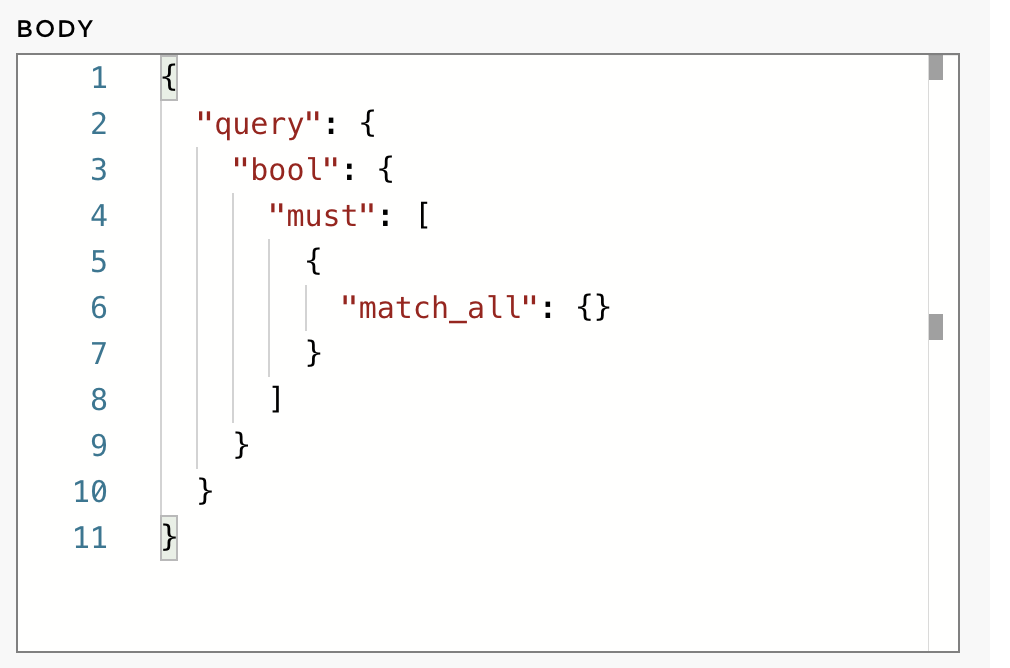
* `Body`: enter your query within a Json format (see an example below)

<figure><img src="https://1809014303-files.gitbook.io/~/files/v0/b/gitbook-x-prod.appspot.com/o/spaces%2FZxYYf1KpgarKMgMsDCrw%2Fuploads%2Fgit-blob-132d71a6b9f7889c56e13ee89a7a95596ac2db6a%2FElasticsearch_query_body.png?alt=media" alt="Data source configuration"><figcaption><p><strong>Data source configuration</strong></p></figcaption></figure>
